
F1 25 PC
Race into realism with F1 25 PC, featuring official teams, advanced physics, stunning graphics, and immersive career modes for the ultimate Formula 1 experience.
F1 25 PC is the latest installment in the officially licensed Formula 1 racing game series, developed by Codemasters and published by EA Sports. Known for delivering realistic motorsport experiences, the F1 franchise has built a massive global fanbase by accurately recreating the excitement, strategy, and intensity of real-world Formula 1 racing. With millions of players worldwide, the series continues to grow in popularity, and F1 25 takes realism, immersion, and performance to the next level on PC.
The game offers an authentic Formula 1 experience, featuring officially licensed teams, drivers, cars, and circuits from the current season. Players can step into the cockpit and compete at legendary tracks while managing tire wear, weather conditions, and race strategy. The refined handling model, improved AI behavior, and enhanced physics system make every race feel intense and unpredictable. From quick races to full championship seasons, the gameplay caters to both casual racing fans and hardcore simulation enthusiasts.
On PC, F1 25 truly shines with enhanced visuals, smoother frame rates, and advanced control customization. The larger screen and precise input options allow players to feel every corner, overtake, and braking zone with greater accuracy. Whether you aim to dominate the championship or simply enjoy realistic racing, downloading F1 25 on PC gives you a complete and immersive Formula 1 experience built for speed lovers.
Key Features
1. Official Formula 1 Teams, Drivers, and Circuits
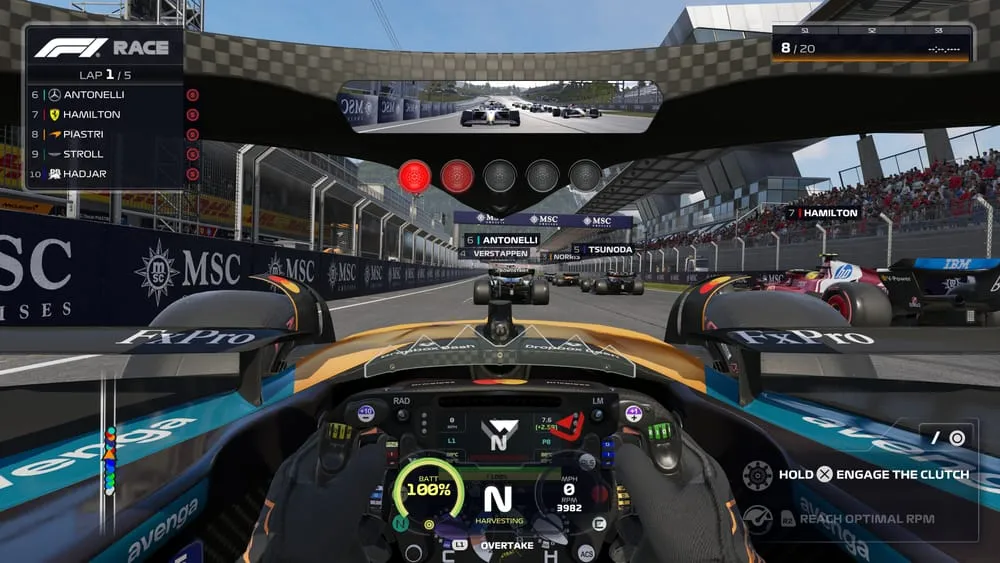
F1 25 PC delivers a fully licensed Formula 1 experience, featuring real-world teams, drivers, and tracks from the current FIA Formula One World Championship season. Every car, helmet, and circuit is carefully recreated to match real-life details, giving new players an authentic motorsport atmosphere. Racing on officially licensed tracks adds realism and helps players learn true Formula 1 layouts and racing conditions.
2. Advanced and Realistic Driving Physics
One of the most important features of F1 25 PC is its improved driving physics. The game offers more realistic handling, braking, and acceleration, making every corner and overtake feel skill-based. Tire grip, weight transfer, and traction are more responsive, helping new players understand how Formula 1 cars behave at high speeds while still offering depth for experienced racers.
3. Deep Career Mode Experience
Career Mode allows players to create their own driver and progress through multiple seasons. New players can start with assists enabled and gradually reduce them as skills improve. Contract negotiations, performance goals, and team development make the career feel dynamic and rewarding. This mode teaches players both racing techniques and long-term progression strategies.
4. Expanded My Team Mode
My Team Mode gives players full control over building and managing their own Formula 1 team. From hiring drivers to upgrading facilities and managing budgets, this feature adds a strategic layer beyond racing. New players learn how off-track decisions impact on-track performance, making the experience more immersive and educational.
5. Smarter AI and Competitive Racing
F1 25 PC introduces improved AI behavior that reacts more realistically during races. AI drivers defend positions, adapt to weather changes, and make strategic pit stops. This creates competitive races that feel unpredictable and exciting. For beginners, adjustable AI difficulty ensures balanced competition without frustration.
6. Dynamic Weather and Track Conditions
Weather plays a major role in races, with changing conditions affecting grip, visibility, and strategy. Rain, dry spells, and track evolution force players to adapt quickly. This feature teaches new players the importance of tire choices and pit timing, adding realism and depth to every race weekend.
7. High-End PC Graphics and Performance
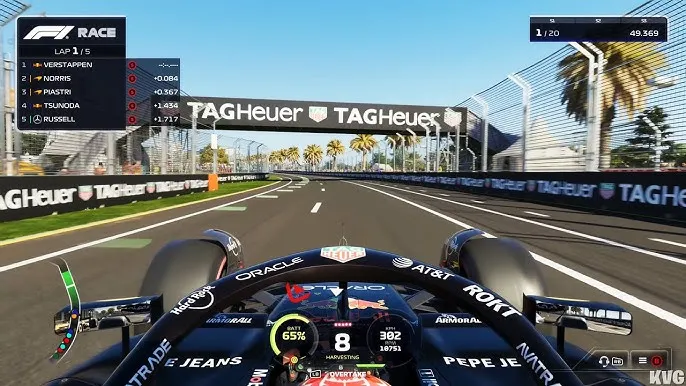
The PC version of F1 25 supports higher resolutions, improved lighting, and smoother frame rates. Cars look more detailed, crowds feel more alive, and tracks appear sharper. These visual improvements make it easier for new players to read braking points and racing lines, enhancing both realism and control.
8. Full Support for Wheels, Controllers, and Keyboard
F1 25 PC offers extensive input support, including racing wheels, controllers, and keyboard setups. Players can fully customize controls to match their driving style. This flexibility helps beginners start comfortably while allowing advanced players to fine-tune precision and responsiveness.
9. Online Multiplayer and Competitive Modes
The game includes online multiplayer racing, ranked events, and custom leagues. Players can compete against racers from around the world, improving skills through real competition. For new players, multiplayer modes offer a fun way to learn racecraft and experience different driving styles.
10. Optimized PC Experience for Long Racing Sessions
F1 25 PC is optimized for stable performance during long play sessions. Faster loading times, adjustable graphics settings, and smooth gameplay ensure reliability. With no battery limitations and strong multitasking support, PC players can enjoy extended races, practice sessions, and championships without interruptions.
How to Download F1 25 on PC
- Click the Download button on this page to safely get the latest PC build.
- Choose your platform (Windows recommended; Mac/Linux may also be available if listed).
- When prompted, Save the file to an easy location (e.g., Downloads or Desktop).
- If the file is a .zip (or .rar), right-click it and select Extract All… to a new folder.
- Open the extracted folder and double-click
F1 25 PC.exeto launch. - If Windows SmartScreen appears, click More info → Run anyway (only proceed if you downloaded from the button on this page).
- Optional: right-click the .exe and choose Create shortcut to pin it to Start/Desktop.
- In Options/Settings, set fullscreen/windowed, audio levels, and keybinds (WASD/Arrows).
- For future updates, return to this page and click the Download button again, then replace your old game folder with the new one.
System Requirements
| Component | Minimum Requirements | Recommended Requirements |
|---|---|---|
| OS | Windows 10 (64-bit) | Windows 11 (64-bit) |
| Processor | Intel Core i5 | Intel Core i7 |
| RAM | 8 GB | 16 GB |
| Graphics | NVIDIA GTX 1060 / AMD equivalent | RTX 2060 or better |
| Storage | 80 GB available space | 80 GB SSD |
| DirectX | Version 12 | Version 12 |
How to Play F1 25 on PC
Playing F1 25 on PC begins with choosing a game mode that matches your experience level, such as Career Mode, My Team, Time Trial, or Quick Race. Before heading onto the track, it is important to configure your controls. The PC version supports keyboard, controllers, and racing wheels, allowing you to adjust steering sensitivity, braking assists, traction control, and camera angles. New players should start with driving assists enabled to learn racing lines, braking points, and cornering techniques. Practicing in free practice sessions helps you understand track layouts and car behavior without race pressure.
During races, success depends on both driving skill and strategic decisions. Managing tire wear, fuel consumption, and ERS deployment plays a major role in overall performance. Players must decide when to pit, which tire compounds to use, and how aggressively to push the car. Weather changes and safety car situations can shift race outcomes, requiring quick adaptation. On PC, smooth frame rates and precise input response make it easier to control the car at high speeds, helping players improve lap times and race consistency over time.

Why Play F1 25 on PC?
Playing F1 25 on PC offers a superior racing experience thanks to enhanced graphics and performance settings. Higher resolutions, smoother frame rates, and improved lighting make tracks, cars, and weather effects more realistic and immersive. Keyboard and mouse support, alongside controllers and racing wheels, gives players flexible control options to suit different driving styles. Unlike portable platforms, PC gaming eliminates battery drain, allowing for long racing sessions without interruption.
PC players also benefit from a larger screen experience, which improves visibility during tight corners, overtakes, and braking zones. Multitasking is easier on PC, enabling players to stream, record gameplay, or adjust settings without leaving the game. Where supported, cross-platform progress syncing allows players to continue their career across compatible platforms. With customization, stability, and comfort, the PC version is ideal for players who want full control and the most immersive Formula 1 racing experience.With performance customization and stable gameplay, the PC version is ideal for players who want the most realistic and flexible Formula 1 racing experience.
FAQs
Conclusion
F1 25 PC delivers an authentic, thrilling Formula 1 racing experience with realistic physics, official content, and deep game modes. From immersive career progression to competitive multiplayer racing, it offers something for every racing fan. Enhanced PC performance, flexible controls, and stunning visuals make it the best way to enjoy Formula 1 digitally. Use the download button in this article and start your journey toward racing glory today.