Gacha Life PC
Create your dream anime character and explore a fun virtual world with Gacha Life PC customize, play mini-games, and tell your own stories on your computer!
If you’ve ever dreamed of creating your own anime characters, designing cute outfits, or diving into an adorable virtual world full of creativity, then Gacha Life PC is the game for you. Developed by Lunime, this anime dress-up and life simulation game has captured the hearts of millions of players across the world since its debut. With its charming visuals, vast customization options, and endless creative potential, Gacha Life has become a fan favorite among gamers of all ages.
Originally designed for mobile platforms, Gacha Life quickly became a global sensation with over 100 million downloads. Its popularity inspired the release of a PC version, allowing players to enjoy smoother performance, higher resolution graphics, and an overall enhanced gameplay experience. Whether you’re designing your dream anime avatar, exploring various mini-games, or creating your own short films in Studio Mode, Gacha Life PC offers limitless possibilities.
Playing Gacha Life on PC provides a whole new level of enjoyment. No battery worries, no lag—just pure creativity on a larger screen. Ready to explore your inner designer? Scroll down and hit the download button to safely download Gacha Life for PC and start your anime adventure today!
Key Features
1. Endless Character Customization
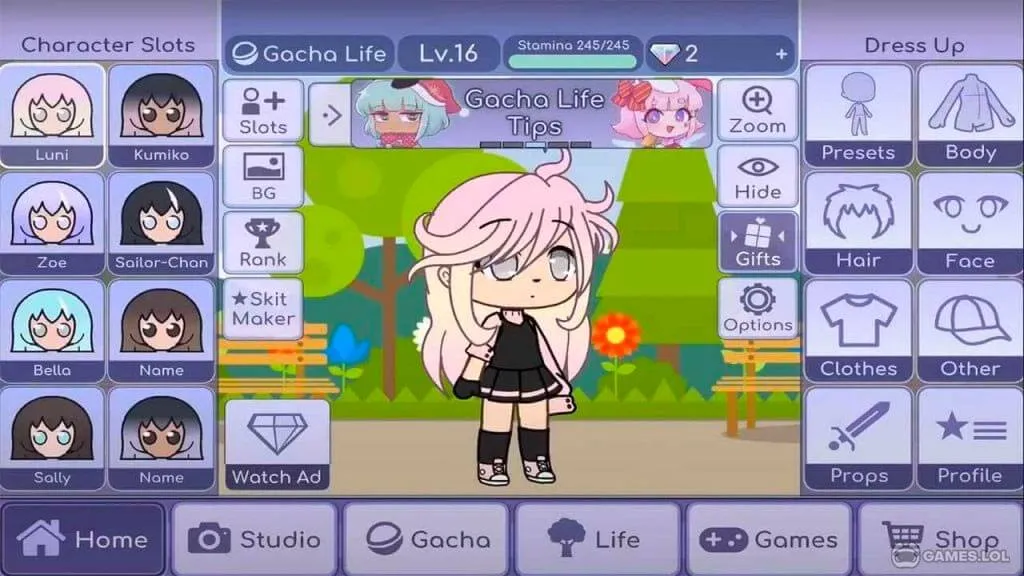
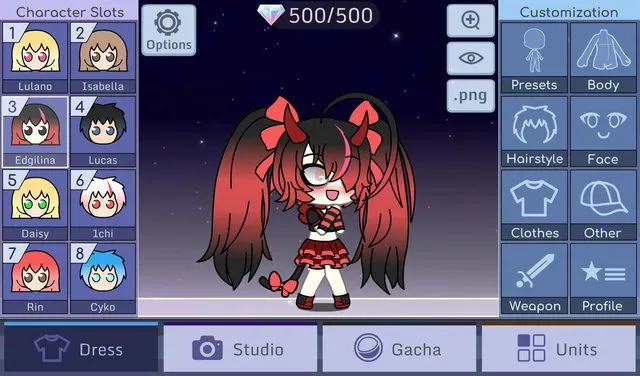
One of the biggest attractions of Gacha Life PC is its in-depth character customization. You can design your anime avatars from head to toe choose hairstyles, eye shapes, skin tones, accessories, and fashionable outfits. With over a hundred clothing options, colors, and props, every player can create truly unique characters that reflect their personality or story theme.
2. Studio Mode – Tell Your Own Anime Story
In Studio Mode, you can set up your characters in various poses and backgrounds to create scenes, skits, or full stories. Add text bubbles, adjust camera angles, and express emotions through character gestures. Many players use this mode to produce anime-style mini-movies or comic-like storylines to share online.

3. Life Mode – Explore and Interact
The Life Mode of Gacha Life PC version allows players to explore different locations, meet NPCs, and uncover hidden surprises. You can visit schools, parks, and cafes while chatting with characters to build relationships. This feature brings your avatars to life in a social, interactive world.
4. Gacha System – Collect and Unlock Characters
The fun doesn’t stop at dressing up! The Gacha system lets players collect new characters, pets, and rare items by using gems. Each spin gives you the thrill of unlocking something new, adding a touch of excitement and reward to your creative journey.
5. Mini-Games for Rewards and Fun
Beyond customization, Gacha Life PC includes entertaining mini-games like Duck & Dodge and Phantom’s Remix. These simple yet addictive games let you earn gems to unlock more outfits and accessories, giving you extra motivation to play and improve your skills.
6. Offline Gameplay Support
A major advantage of Gacha Life on PC is that it doesn’t require an internet connection. You can enjoy the full game anytime, anywhere even without Wi-Fi. This makes it perfect for players who want uninterrupted creativity and entertainment.
7. Enhanced Graphics and Performance on PC
The PC version of Gacha Life offers smoother gameplay, faster loading times, and clearer visuals compared to the mobile version. High-resolution graphics make every scene look vibrant and detailed, ensuring your characters and stories shine on the big screen.
8. Keyboard and Mouse Controls
Using a keyboard and mouse gives you greater control when customizing characters or navigating menus. It’s faster and more precise than tapping on a small touchscreen, making the Gacha Life PC version ideal for players who value efficiency and accuracy.
9. Safe and Family-Friendly Environment
Developed by Lunime, Gacha Life maintains a creative, non-violent, and family-friendly atmosphere. There’s no graphic content or inappropriate dialogue, making it a safe space for gamers of all ages to explore their artistic side.
10. Free-to-Play with Endless Creativity
Lastly, Gacha Life PC is completely free to download and play. Every player can access all major features without spending a dime. The combination of freedom, creativity, and accessibility makes it one of the most beloved anime dress-up games worldwide.
How to Download Gacha Life on PC
- Click the Download button on this page to safely get the latest PC build.
- Choose your platform (Windows recommended; Mac/Linux may also be available if listed).
- When prompted, Save the file to an easy location (e.g., Downloads or Desktop).
- If the file is a .zip (or .rar), right-click it and select Extract All… to a new folder.
- Open the extracted folder and double-click
Gacha Life PC.exeto launch. - If Windows SmartScreen appears, click More info → Run anyway (only proceed if you downloaded from the button on this page).
- Optional: right-click the .exe and choose Create shortcut to pin it to Start/Desktop.
- In Options/Settings, set fullscreen/windowed, audio levels, and keybinds (WASD/Arrows).
- For future updates, return to this page and click the Download button again, then replace your old game folder with the new one.
System Requirements
| Specification | Minimum Requirements | Recommended Requirements |
|---|---|---|
| OS | Windows 7/8/10/11 | Windows 10/11 |
| Processor | Intel Core i3 or equivalent | Intel Core i5 or higher |
| RAM | 2 GB | 4 GB or more |
| Graphics | Intel HD Graphics | Dedicated GPU (NVIDIA/AMD) |
| Storage Space | 500 MB available | 1 GB available |
| Internet Connection | Not required (Offline play supported) | Required only for updates |
How to Play Gacha Life on PC
Playing Gacha Life PC is a simple yet enjoyable experience for gamers of all levels. After you’ve downloaded and installed the Gacha Life PC version, open the game and begin by creating your first anime avatar. The interface is intuitive use your mouse to select hairstyles, outfits, accessories, and background scenes. You can also adjust character poses, expressions, and dialogue for a personalized touch. Once your characters are ready, explore different game modes like Life Mode and Studio Mode to interact with NPCs, create stories, and build your unique world.
In Life Mode, you can travel across various locations such as schools, cafes, and parks, meeting characters and unlocking new interactions. Try the Mini-Games to earn gems that help you unlock more customization options. With a larger screen and precise mouse controls, playing Gacha Life on PC enhances both creativity and gameplay immersion.

Why Play Gacha Life on PC?
Choosing to play Gacha Life on computer gives players several clear advantages. The PC version offers enhanced graphics, faster performance, and smoother animations, allowing your characters and scenes to look more vibrant. Keyboard and mouse controls make it easier to navigate menus and design avatars without the limitations of touchscreen input.
Another big plus is the convenience factor. Playing Gacha Life PC version means no battery drain, no storage limits, and the ability to multitask while gaming. You can also sync your progress across devices for seamless gameplay. Whether you’re creating stories or showcasing your designs online, the PC platform provides the best experience for every Gacha Life fan.
FAQs
Conclusion
Gacha Life PC opens the door to a colorful, creative world where your imagination can shine. With endless customization options, immersive story modes, and enhanced PC performance, it’s the best way to experience the magic of Lunime’s anime universe. Click the download button now to safely download Gacha Life for PC and start creating your dream anime characters today!