Blur PC
Race, boost, and battle in Blur PC, an explosive arcade racer with real cars, tactical power-ups, smooth controls, and intense multiplayer action.
Blur PC is a fast-paced arcade-style racing game that blends realistic cars with intense vehicular combat mechanics. Developed by Bizarre Creations and published by Activision, the game gained a cult following for its unique mix of traditional circuit racing and aggressive power-up-based combat. Unlike pure simulation racers, Blur focuses on fun, chaos, and strategy, making every race unpredictable and adrenaline-filled. Its competitive design has helped it remain popular among PC gamers even years after its release.
What made Blur stand out at launch was its innovative approach to racing. Instead of realistic damage models, players use offensive and defensive power-ups to outmaneuver rivals. The game features real-world licensed cars from top manufacturers, but places them in arcade-driven races where skillful driving and smart power-up usage matter more than raw speed. This balance between accessibility and depth helped Blur attract both casual players and hardcore racing fans.
From a gameplay perspective, Blur PC delivers thrilling races filled with explosions, boosts, and last-second comebacks. Tracks are inspired by real cities and designed to encourage aggressive racing and tactical decision-making. On PC, the experience is even better thanks to smoother performance, customizable controls, and enhanced visuals. If you’re looking for a racing game that prioritizes excitement and competitive fun, scroll down and use the download button available on this page to safely download Blur and start racing on your computer.
Key Features
1. Arcade-Style Vehicular Combat Racing
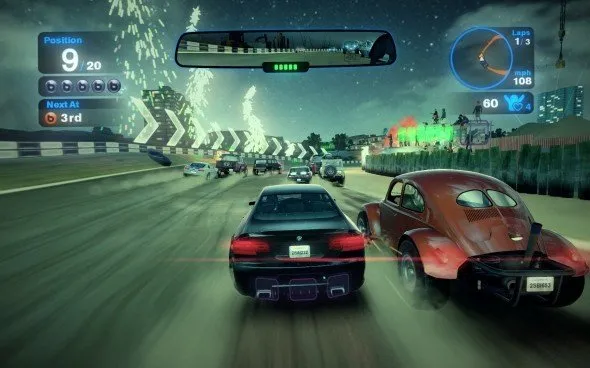
Blur PC is not a traditional racing simulator it is a pure arcade racing experience mixed with intense vehicular combat. Instead of focusing only on lap times, players must balance speed with smart power-up usage. Races are chaotic, fast, and unpredictable, keeping players engaged from start to finish. New players quickly learn that winning is not just about driving fast but also about surviving attacks and striking rivals at the right moment.
2. Strategic Power-Up System
One of the game’s core mechanics is its power-up system. Players can collect offensive, defensive, and boost abilities scattered across the track. These include shock attacks, mines, shields, and speed boosts. Learning when to use each power-up is critical, as poor timing can leave you vulnerable. This system adds a strong layer of strategy, making every race feel tactical rather than repetitive.
3. Real-World Licensed Cars
Blur features a wide selection of officially licensed vehicles from well-known manufacturers. Each car has its own handling style, speed balance, and acceleration characteristics. This variety allows players to choose vehicles that match their driving preferences. For new players, experimenting with different cars helps them understand how handling and speed affect combat-focused races.
4. Skill-Based Driving Mechanics
Despite its arcade nature, Blur PC rewards skillful driving. Clean cornering, proper braking, and smart positioning still matter greatly. Players who master drifting, racing lines, and speed management gain a noticeable advantage. This balance between accessibility and skill depth makes the game enjoyable for beginners while still rewarding experienced racers.
5. Aggressive and Intelligent AI Opponents
The AI in Blur is designed to be competitive and aggressive. Opponents actively use power-ups, block racing lines, and attack strategically rather than racing passively. This keeps races challenging even in single-player modes. New players are encouraged to improve quickly, as careless driving is punished by relentless AI pressure.
6. Diverse and Dynamic Race Tracks
Blur PC offers a variety of tracks inspired by real-world city locations. Each track features different layouts, shortcuts, and combat hotspots. Some tracks emphasize high-speed straights, while others focus on tight corners and power-up placement. This diversity prevents races from feeling repetitive and encourages players to adapt their strategies based on the track.
7. Competitive Multiplayer and Split-Screen Support
Multiplayer is a major highlight of Blur. Players can race competitively against others, using both driving skill and power-up tactics. Split-screen support also allows local multiplayer sessions, making it a great choice for couch competition. For new players, multiplayer offers a fast way to learn advanced tactics by observing others.
8. Rewarding Progression and Unlock System
The game includes a progression system where players earn points by winning races and completing challenges. These points unlock new cars, events, and gameplay modes. This steady sense of progression keeps players motivated and provides long-term goals beyond individual races.
9. Customizable Controls and PC Optimization
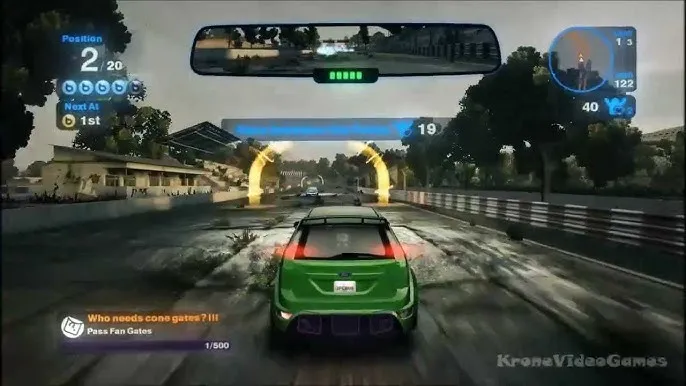
Blur PC allows players to customize controls for keyboard, mouse, or controllers. Sensitivity, bindings, and input preferences can be adjusted for comfort and precision. The PC version is also optimized for smooth performance, offering stable frame rates and responsive input, which is crucial in fast-paced races.
10. Perfect Balance of Chaos and Control
What truly defines Blur is its balance between chaos and control. Explosions, attacks, and sudden lead changes create thrilling moments, while solid driving mechanics ensure players never feel powerless. For new players, this balance makes the game exciting without being overwhelming, delivering constant action while still rewarding skill and strategy.
How to Download Blur on PC
- Click the Download button on this page to safely get the latest PC build.
- Choose your platform (Windows recommended; Mac/Linux may also be available if listed).
- When prompted, Save the file to an easy location (e.g., Downloads or Desktop).
- If the file is a .zip (or .rar), right-click it and select Extract All… to a new folder.
- Open the extracted folder and double-click
Blur PC.exeto launch. - If Windows SmartScreen appears, click More info → Run anyway (only proceed if you downloaded from the button on this page).
- Optional: right-click the .exe and choose Create shortcut to pin it to Start/Desktop.
- In Options/Settings, set fullscreen/windowed, audio levels, and keybinds (WASD/Arrows).
- For future updates, return to this page and click the Download button again, then replace your old game folder with the new one.
System Requirements
| Requirement | Minimum | Recommended |
|---|---|---|
| OS | Windows 7 | Windows 10 |
| Processor | Intel Core 2 Duo | Intel Core i5 |
| RAM | 2 GB | 4 GB |
| Graphics | NVIDIA 6600 / ATI X1600 | NVIDIA GTX 560 |
| DirectX | Version 9.0c | Version 11 |
| Storage | 14 GB available space | 14 GB available space |
| Sound Card | DirectX Compatible | DirectX Compatible |
How to Play Blur on PC
Playing Blur on PC is all about mastering both high-speed racing and smart power-up usage. After launching the game, start by configuring your graphics and control settings to ensure smooth performance. Choose whether you prefer a keyboard or a controller, then adjust sensitivity and key bindings so steering, braking, and power-up activation feel comfortable. Learning the tracks is essential, as knowing where sharp turns, shortcuts, and power-up pickups are located gives you a strong advantage. Focus on maintaining speed through corners while positioning your car to collect useful abilities during the race.
During races, success depends on timing and awareness rather than raw speed alone. Use defensive power-ups when you’re leading to protect yourself from incoming attacks, and save offensive abilities for moments when rivals are grouped closely. Avoid wasting boosts early; instead, use them on straight sections or during final laps to overtake opponents. Keep an eye on your surroundings, as Blur’s races are unpredictable and positions can change quickly. With practice, PC players can develop precise control, effective power-up management, and consistent race-winning strategies.

Why Play Blur on PC?
Playing Blur on PC provides a noticeably enhanced racing experience compared to other platforms. Higher resolutions, smoother frame rates, and improved visual clarity make fast-paced races easier to follow and more immersive. A larger screen allows players to better track rivals, power-up effects, and upcoming turns. Keyboard and mouse or controller customization gives players greater control precision, which is especially helpful during intense combat racing moments.
PC gaming also offers unmatched convenience and flexibility. There’s no battery drain to worry about, allowing long racing sessions without interruption. Multitasking is simple, letting players adjust settings, record gameplay, or communicate with friends while racing. In supported setups, cross-platform progress syncing helps players continue their progress seamlessly. With better performance, control freedom, and overall comfort, the PC version is the ideal way to enjoy Blur’s explosive arcade racing action.petitive and casual racing fans alike.
FAQs
Conclusion
Blur PC delivers an exciting blend of high-speed racing and explosive vehicular combat that still feels fresh today. With licensed cars, strategic power-ups, and competitive gameplay, it offers endless fun for racing fans. The PC version enhances performance, controls, and visual clarity, making it the best way to experience the game. Scroll down and use the download button available in this article to safely download Blur and enjoy thrilling arcade racing on your computer.